
Bright SideDigital Motion Project · Pop
0:00

En iyi lisanslı müzik, gelmiş geçmiş en iyi editörle buluştu. The best cleared music, met the best editor ever built.
Videonu iPhone veya iPad’de kurgula, Snapmuse kataloğundan müziğini seç. Studio Pro ile dışa aktardığın videonun müzik lisansı da yanında gelsin. Yakında App Store’da. Edit your video on iPhone or iPad and find its soundtrack in the Snapmuse catalog. Export with Studio Pro and the music licence comes with your video. Coming to the App Store.
Yakında App Store’daComing to the App Store iOS 16 ve üzeri · iPhone ve iPad iOS 16 and later · iPhone and iPad
Beş türden 30 saniyelik kesitleri dinle. Her ziyarette ve yeni parçalar düğmesine bastığında seçki değişir.Explore 30-second clips across five genres. Your selection changes on every visit or whenever you ask for new tracks.


Bunlar yalnızca önizleme kesitleridir. Parçaların içinde sesli Snapmuse Studio imzası bulunur.These are preview clips only. Each includes a spoken Snapmuse Studio tag.
Üç adım. Kurgu telefonda başlıyor ve telefonda bitiyor. Three steps. The edit starts on your phone and ends there.
Kendi çektiğin videoyu içe aktar, kes ve sırala. Import your own footage, then cut and arrange it.
Katalogdan bir parça seç; kesimlerini ritme oturt. Pick a track from the catalog and line your cuts up to the beat.
Videoyu telefonuna kaydet, istediğin yere yükle. Save the video to your phone and post it wherever you publish.
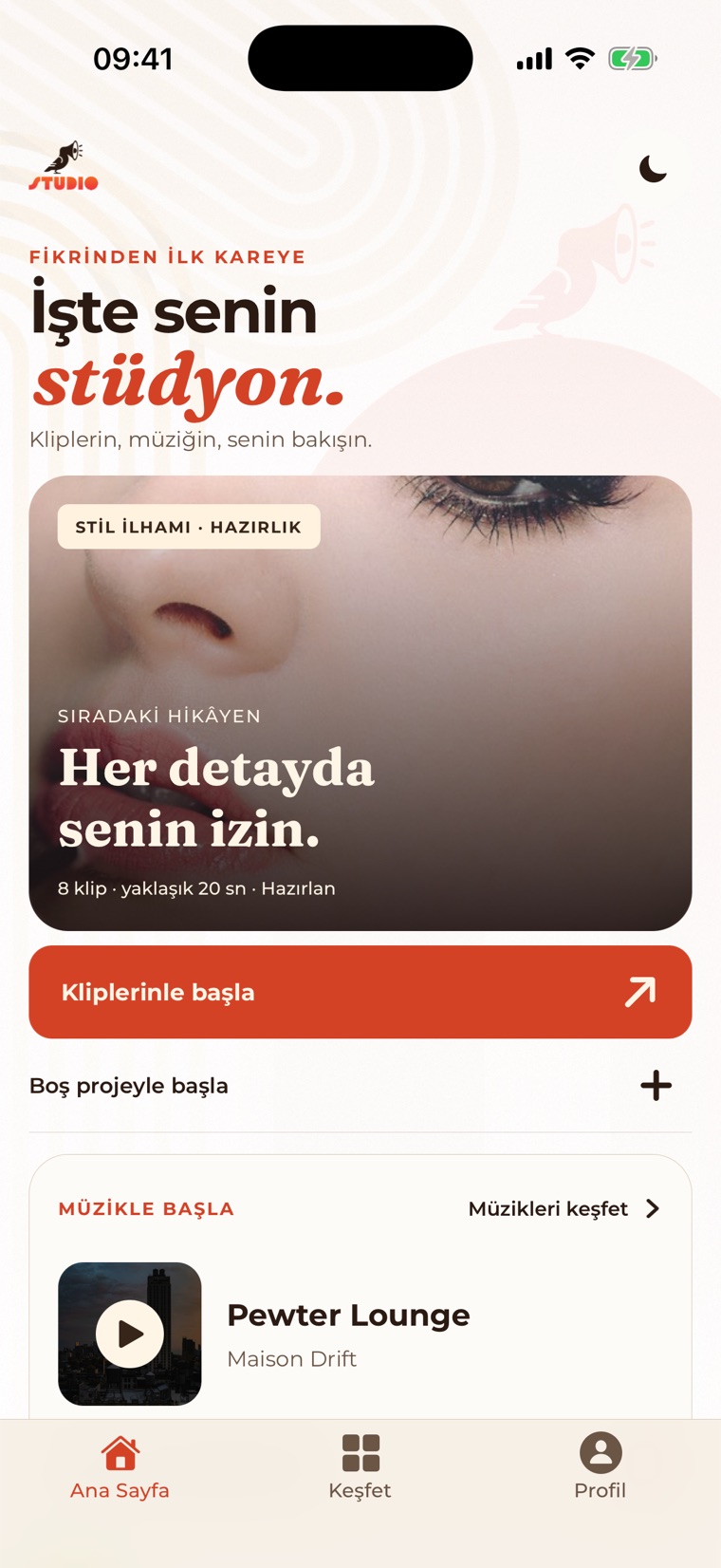
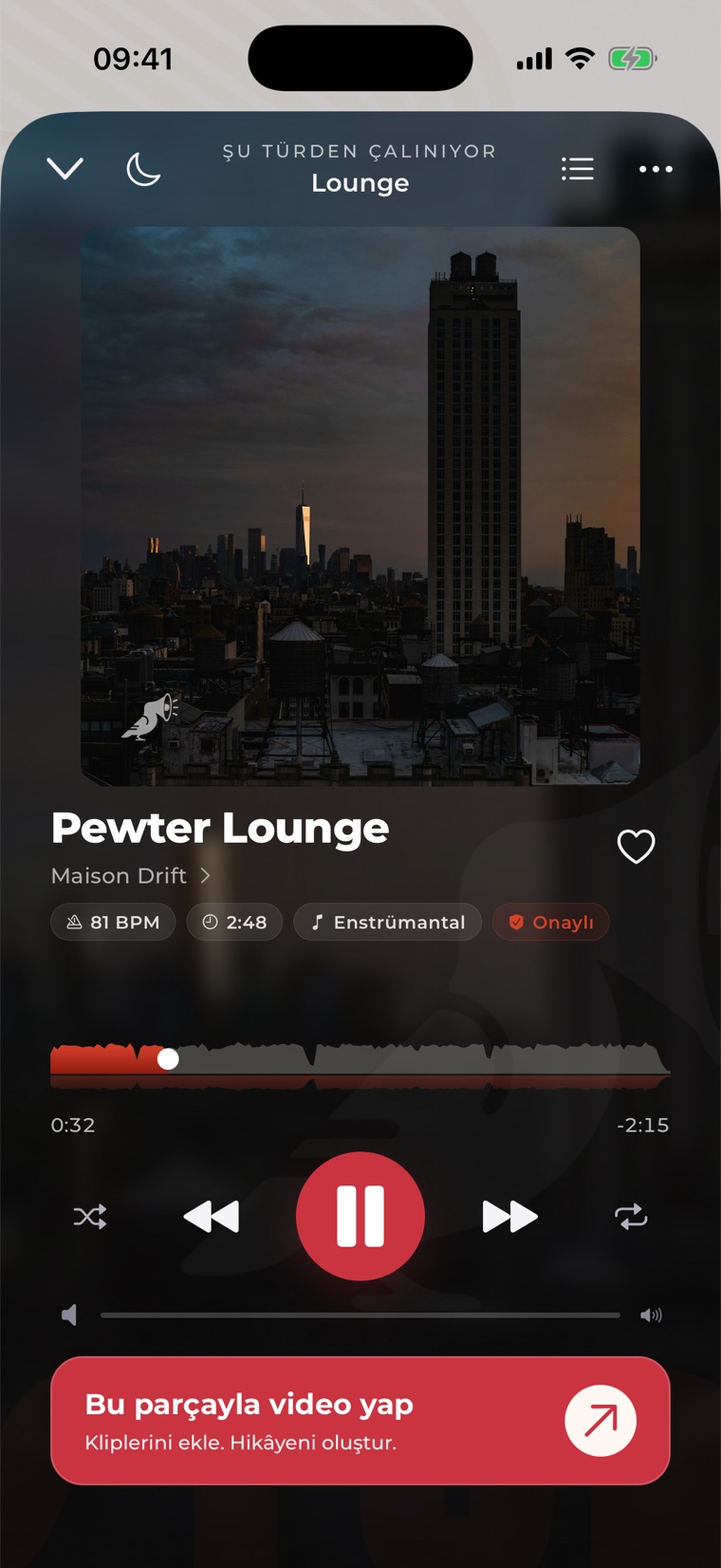
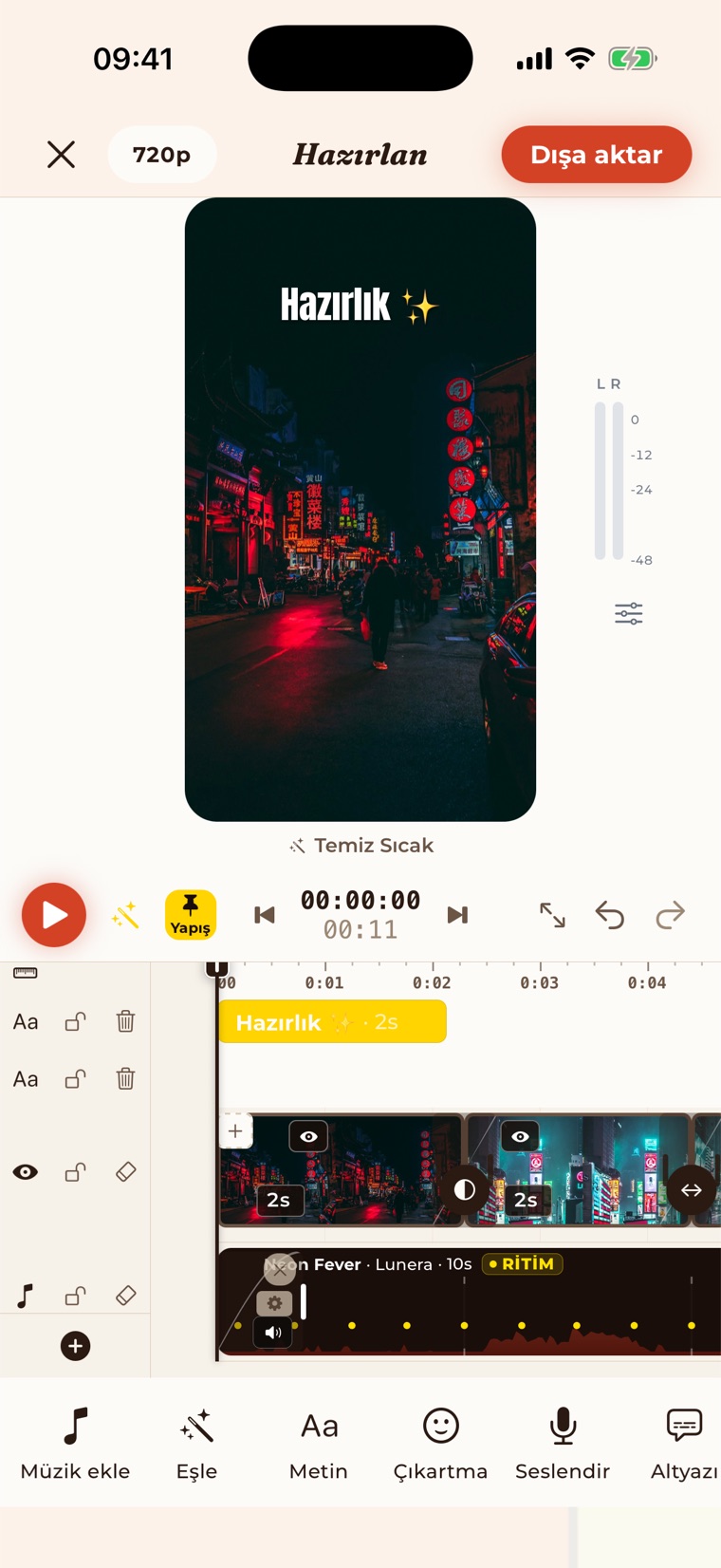
Uygulamadan alınmış gerçek ekran görüntüsü — temsilî değil. A real screenshot from the app — not a representation.
Uygulamanın gerçek ekran kaydı — canlandırma değil. A real screen recording of the app — not an animation.
Bir şablona dokun, kliplerini seç. Tempo, geçişler ve müzik hazır gelir. Tap a template, pick your clips. Pacing, transitions and music come ready.
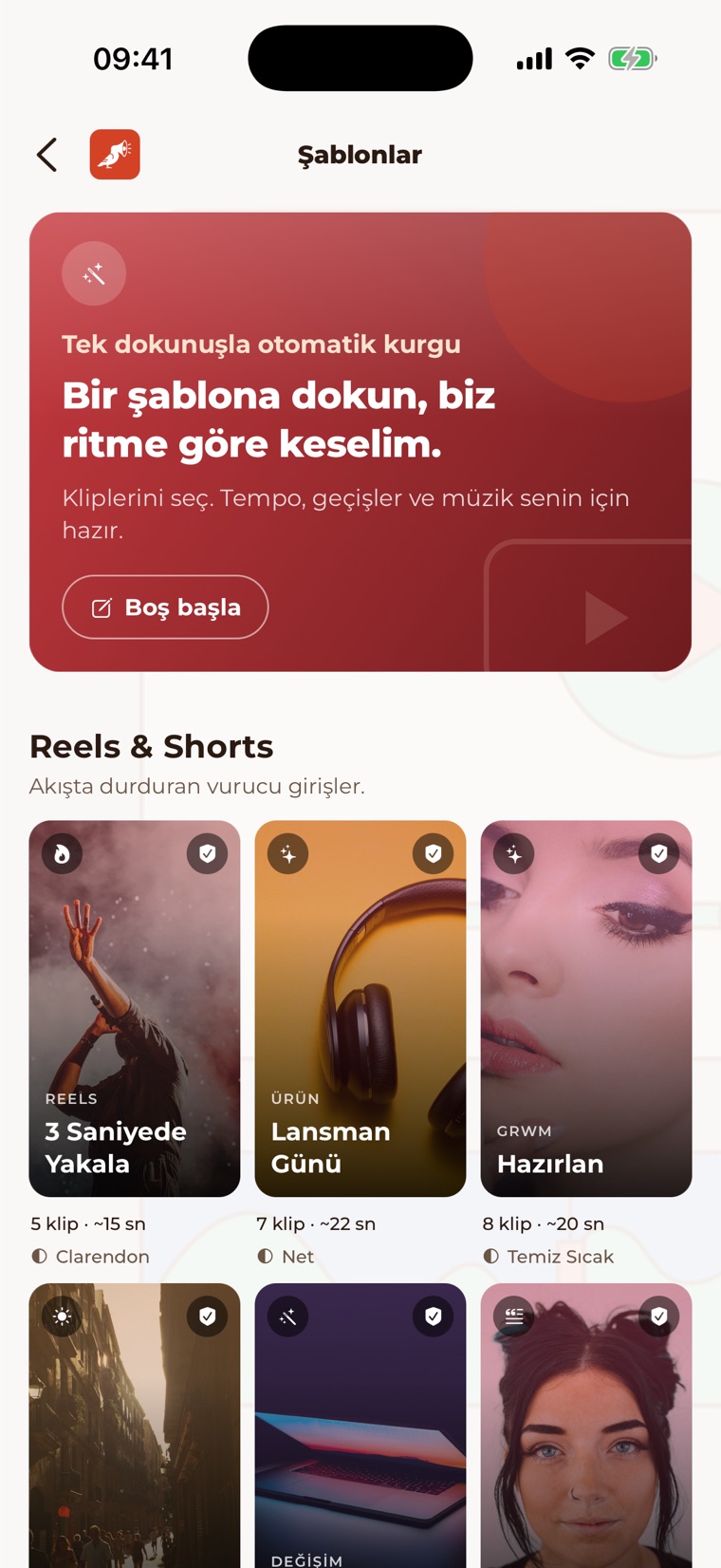
Altı rafta 21 hazır kurgu var: Reels & Shorts, Yaşam, Seyahat, Mutfak, Sinematik ve Patlayanlar. Kliplerini ya da fotoğraflarını seçiyorsun, kesmeler müziğin ritmine oturuyor — sonra istersen zaman çizelgesinden her şeye tek tek dokunabilirsin. Bunlardan altısı: 21 ready edits across six shelves: Reels & Shorts, Lifestyle, Travel, Cuisine, Cinematic and Bangers. You pick the clips or photos, the cuts land on the beat — then you can still touch every one of them on the timeline. Six of them:
Şablonlarda kullandığımız katalog müziği, Studio Pro ile dışa aktardığın videoya lisanslanır. Bir platform talep açarsa bağlı kanallar için Content ID Shield kaldırma sürecini koordine eder. Catalog music in templates is licensed for videos you export with Studio Pro. If a platform raises a claim, Content ID Shield coordinates its release for connected channels.
Şablonsuz da kurgularsın. Bugün uygulamada olanlar: You can also edit from scratch. Here is what the app does today:
Evet. Önemli ayrıntı şu: lisans, Studio'dan dışa aktardığın videoya işler — indirdiğin bir ses dosyasına değil. Yes. And the detail that matters: the licence attaches to the video you export from Studio — not to an audio file you download.
Katalog hakları özel devir sözleşmeleriyle alındı. Snapmuse her parçanın tüm ticari haklarına sahip — üçüncü taraf karmaşası yok. Catalog rights acquired through exclusive waiver agreements. Snapmuse holds full commercial rights on every track — no third-party complications.
Studio'nun dışa aktarma akışından çıkan dosya lisanslıdır. Uygulama çıplak ses dosyası vermez ve lisans, export dışındaki kullanımları kapsamaz. The file produced by Studio's export flow is the licensed object. The app does not hand out raw audio, and the licence does not cover use outside that export.
Kanallarını bağla. Snapmuse parçalarına gelen talepler önce partner plak şirketimize gider, aktif Studio Pro üyeleri için release'i o koordine eder — genelde 48 saat içinde. Connect your channels. Claims on Snapmuse tracks go to our partner label first, which coordinates release for active Studio Pro subscribers — usually within 48 hours.
Studio'da ürettiğin her video, uygulamadaki dışa aktarma geçmişine lisans kaydıyla düşer: parça, tarih, süre ve dışa aktardığın ticari kullanım planı. İddia değil, kayıt. Every video you make in Studio lands in the app's export history with its licence record: track, date, duration and the commercial-use plan you exported on. Not a claim — a record.
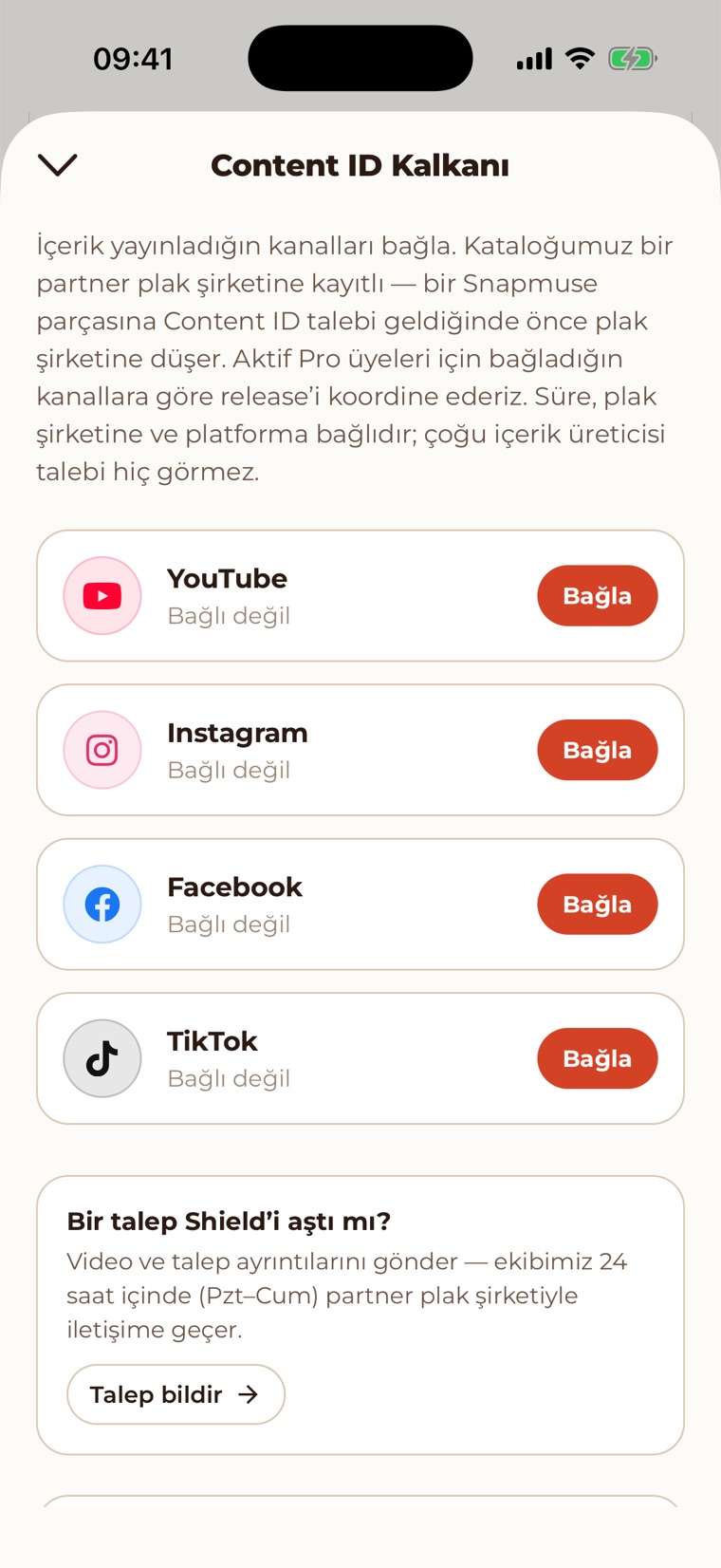
Yayın yaptığın kanalları bağlıyorsun. Bir Snapmuse parçasına Content ID talebi geldiğinde önce partner plak şirketimize düşüyor; aktif Studio Pro üyeleri için release'i bağladığın kanallara göre koordine ediyoruz. You connect the channels where you publish. When a Content ID claim fires on a Snapmuse track it lands with our partner label first; for active Studio Pro subscribers we coordinate release against your connected channels.
Süre plak şirketine ve platforma bağlı — genelde 48 saat içinde. Bir talep Shield'i aşarsa video ve talep ayrıntılarını gönderiyorsun, ekip hafta içi 24 saat içinde devralıyor. Timing depends on the label and the platform — usually within 48 hours. If a claim slips past the Shield you submit the video and claim details, and the team escalates within 24h on weekdays.
Ücretsiz sürüm denemek içindir. Katalogdaki parçaları dinleyebilirsin, ama katalogdan şarkı eklediğin bir videoyu hiç dışa aktaramazsın — filigranlısı bile çıkmaz, orada Studio Pro duvarı var. Kendi müziğinle dışa aktardıkların ise en fazla 60 saniye, 720p ve filigranlı olur. Katalog müziğini kullanarak yayın yapmak için Studio Pro gerekir; ticari kullanım — marka iş birlikleri, müşteri işleri — bu plana dahildir. Kendi yüklediğin müziğin haklarından sen sorumlusun. Bunu indirmeden önce bilmeni istiyoruz. The free tier is for trying it out. You can preview catalog tracks, but a video with a catalog track attached cannot be exported at all — not even watermarked; that is a Studio Pro wall. Exports made with your own music are capped at 60 seconds, 720p, with a watermark. Publishing with catalog music requires Studio Pro; commercial use — brand deals and client work — is included. You are responsible for the rights to music you upload yourself. We would rather you knew that before downloading.
Tam lisans metni ve kısıtlamalar: Kullanım Şartları. Content ID Shield, yalnızca Snapmuse katalog müziğinden kaynaklanan talepleri kapsar. Full licence text and restrictions: Terms of Service. Content ID Shield covers claims arising from Snapmuse catalog music only.
 Pro
Free and Pro
Pro
Free and Pro
Aşağıdaki her satır, uygulamanın bugün uyguladığı gerçek sınırdır. Every row below is a limit the app actually enforces today.
Ücretsiz ve Pro sütunlarını görmek için tabloyu yana kaydır.Swipe the table sideways to compare Free and Pro.
| ÖzellikFeature | ÜcretsizFree | Studio Pro |
|---|---|---|
| Katalogda gezinmeBrowse the catalog | ✓ | ✓ |
| 30 saniyelik önizleme30-second preview | ✓ | ✓ |
| Parçayı tam dinlemeFull-length playback | Haftada 10 (ücretsiz hesapla)10 per week (with a free account) | SınırsızUnlimited |
| Kaydedilen parçaSaved tracks | 5 | SınırsızUnlimited |
| Çalma listeleriPlaylists | 5 | SınırsızUnlimited |
| Dışa aktarma — kendi müziğinleExport — with your own music | Video başına 60 sn, filigranlı, 720pUp to 60 s per video, watermarked, 720p | Sınırsız, filigransız, 4K'ya kadarUnlimited, no watermark, up to 4K |
| Katalog müziğini videoda kullanmaUsing catalog music in a video | — | ✓ |
| Ritme göre otomatik kesimAuto-cut to the beat | 1 öneri görürsün, uygulanmazSee 1 suggestion, can't apply | 3 öneri, tek dokunuşla uygula3 suggestions, apply in one tap |
| Yayınlama lisansıLicence to publish | — | ✓ |
| Ticari kullanımCommercial use | — | ✓ |
| Content ID ShieldContent ID Shield | — | Platform başına 15 kanal15 channels per platform |
| Öncelikli destekPriority support | — | ✓ |
Ücretsiz filigran, videoya işlenen görünür bir logodur. Studio Pro aylık ya da yıllık alınır ve istediğin an iptal edilir; ülkene göre güncel fiyatı App Store'da görürsün. The free watermark is a visible logo burned into the video. Studio Pro comes monthly or yearly and can be cancelled anytime; the App Store shows the current price for your region.
Aylık ve yıllık abonelik var. Yıllık planda 7 gün ücretsiz deneme ile başlıyorsun; aylık planda deneme yok. Monthly and annual plans. The annual plan starts with a 7-day free trial; the monthly plan has no trial.
İstediğin an iptal edebilirsin — abonelik App Store üzerinden yönetiliyor. Cancel anytime — the subscription is managed through the App Store.
Güncel fiyatı kendi para biriminde App Store'da görürsün. You will see the current price in your own currency on the App Store.